Help us protect Louisiana's children. Call 1-855-4LA-KIDS (1-855-452-5437) toll-free, 24 hours a day, seven days a week.
Report Child Abuse & NeglectFY26 Business Plan Dashboard

Progressing Toward a Stronger, Child-Centered DCFS
The Department of Children and Family Services (DCFS) is transforming to strengthen its focus on children, creating the Office of Child Support and the Office of Child Welfare within DCFS. Guided by ACT No. 477, the FY26 Business Plan aligns every part of DCFS around one purpose: protecting and serving Louisiana's children.
This dashboard provides a transparent look at our progress toward eight key commitments that guide this transformation. Each section highlights data, performance measures, and outcomes that reflect our ongoing work to improve services, strengthen accountability, and deliver better results for children and families across Louisiana.
Note that for FY26 Business Plan goals that do not appear in the dashboard, DCFS is developing procedures to accurately capture this data. Updates will occur as data is made available.
Legislative Background
The reorganization of the Department of Children and Family Services is guided by Act 477 of the 2025 Regular Legislative Session, formerly House Bill 617. This legislation restructures DCFS to focus solely on child support and child welfare, by ultimately transferring adult-centered programs to other state agencies.
Act 477 establishes a more child-centered department dedicated to protecting children, strengthening families, and improving outcomes through greater focus, accountability, and coordination.
Related Resources:
Eight Commitments
 Commitment 1: Ensure Appropriate Staffing Levels
DCFS is committed to maintaining sufficient staffing to ensure timely responses to reports of child maltreatment. This includes expanding coverage during evenings, weekends, and holidays through the creation of a dedicated second-shift team. This approach will reduce response times, alleviate staff burnout, and ensure children are protected at all times.
- To print: Click the link below to open the graphic, then right-click the full webpage view and select Print.
Note: Make sure “Background graphics” (or “Background images”) is checked in your print settings so the design appears correctly.
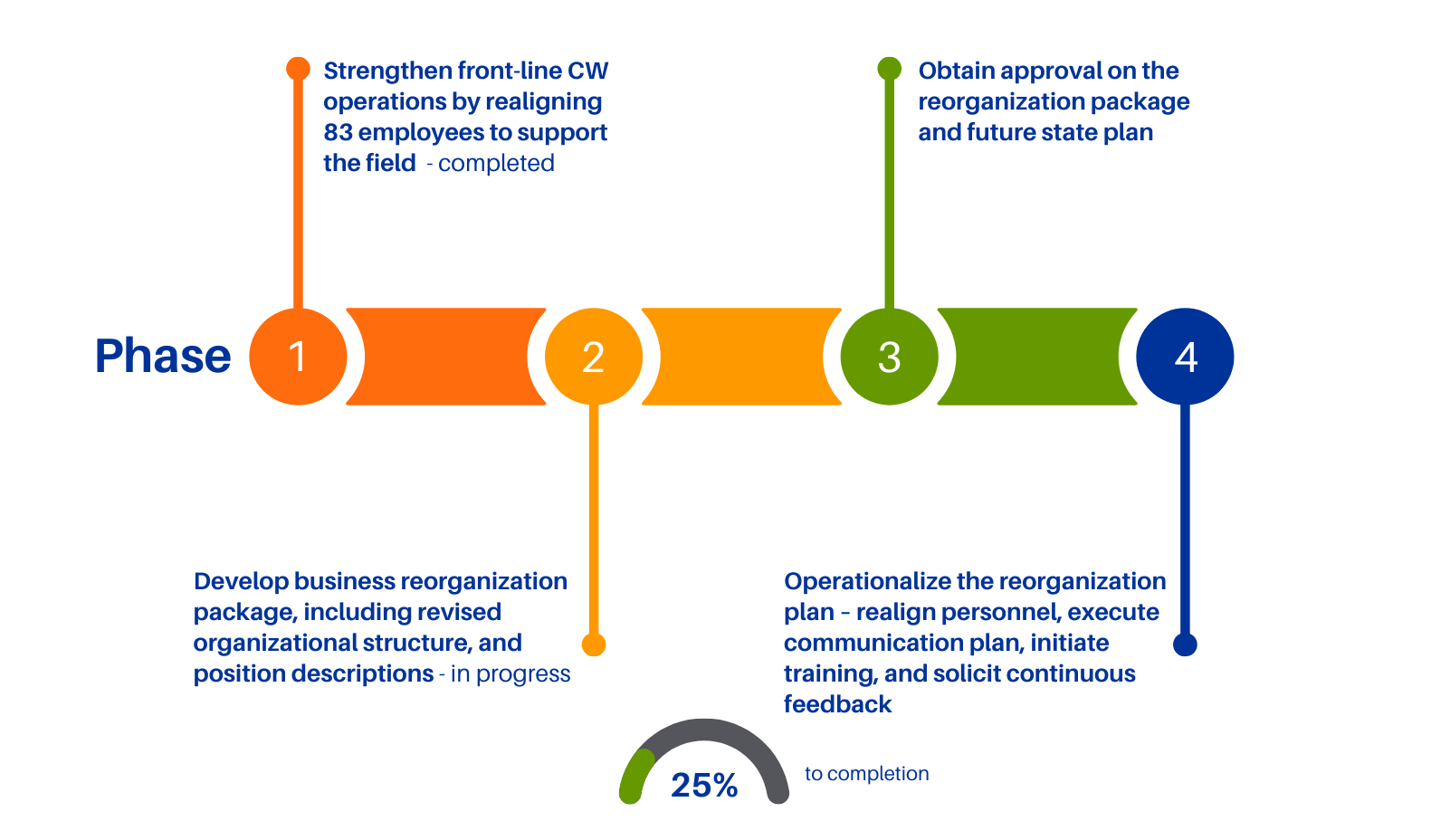
 Commitment 2: Complete Strategic Business Reorganization
A comprehensive reorganization of the department’s structure will optimize the use of resources, streamline workflows, and improve service delivery. This effort will align roles and responsibilities with the department’s strategic goals, eliminate redundancies, and enhance coordination across divisions.
- To print: Click the link below to open the graphic, then right-click the full webpage view and select Print.
Note: Make sure “Background graphics” (or “Background images”) is checked in your print settings so the design appears correctly.
 Commitment 3: Conduct Comprehensive Market Study for Competitive Compensation
To recruit and retain a skilled and dedicated workforce, DCFS will conduct a statewide market study to assess current compensation levels. The findings will inform strategies to offer competitive salaries, ensuring the department remains an employer of choice in the public sector.
- To print: Click the link below to open the graphic, then right-click the full webpage view and select Print.
Note: Make sure “Background graphics” (or “Background images”) is checked in your print settings so the design appears correctly.
 Commitment 4: Leverage Modern Technology
DCFS will invest in compliant, modern, user-friendly technology platforms that improve case management, data sharing, and communication. These tools will reduce administrative burdens, increase efficiency, and empower staff to focus more on direct service to children and families.
- To print: Click the link below to open the graphic, then right-click the full webpage view and select Print.
Note: Make sure “Background graphics” (or “Background images”) is checked in your print settings so the design appears correctly.
 Commitment 5: Maintain Data Accuracy, Transparency, and Outcome Reporting
Reliable data is essential for accountability and informed decision-making. DCFS will implement rigorous data quality controls and develop transparent reporting systems that track progress towards established measurable outcomes.
- To print: Click the link below to open the graphic, then right-click the full webpage view and select Print.
Note: Make sure “Background graphics” (or “Background images”) is checked in your print settings so the design appears correctly.
 Commitment 6: Use Historical Data to Inform Evidence-Based Policy
By analyzing historical trends and outcomes, DCFS will develop policies grounded in evidence and best practices. This data-driven approach will help the department anticipate challenges, allocate resources effectively, and implement interventions that have proven impact.
- To print: Click the link below to open the graphic, then right-click the full webpage view and select Print.
Note: Make sure “Background graphics” (or “Background images”) is checked in your print settings so the design appears correctly.
 Commitment 7: Enforce Timeliness Requirements and Strengthen Process Controls
DCFS will prioritize enforcing current policy requirements around timeliness and implement robust process controls to prevent future delays. This will standardize procedures, improve case tracking systems, and ensure timely follow-up on all reports and services.
- To print: Click the link below to open the graphic, then right-click the full webpage view and select Print.
Note: Make sure “Background graphics” (or “Background images”) is checked in your print settings so the design appears correctly.
 Commitment 8: Enhance Accountability Through Audit Implementation
DCFS will rigorously implement recommendations from internal and external audits to strengthen oversight and accountability. This will establish clear expectations and timelines, assign responsibility, and implement corrective actions to maintain compliance and improve transparency.
- To print: Click the link below to open the graphic, then right-click the full webpage view and select Print.
Note: Make sure “Background graphics” (or “Background images”) is checked in your print settings so the design appears correctly.